
Systems guide
Connect your ERP to FBR — without starting from zero
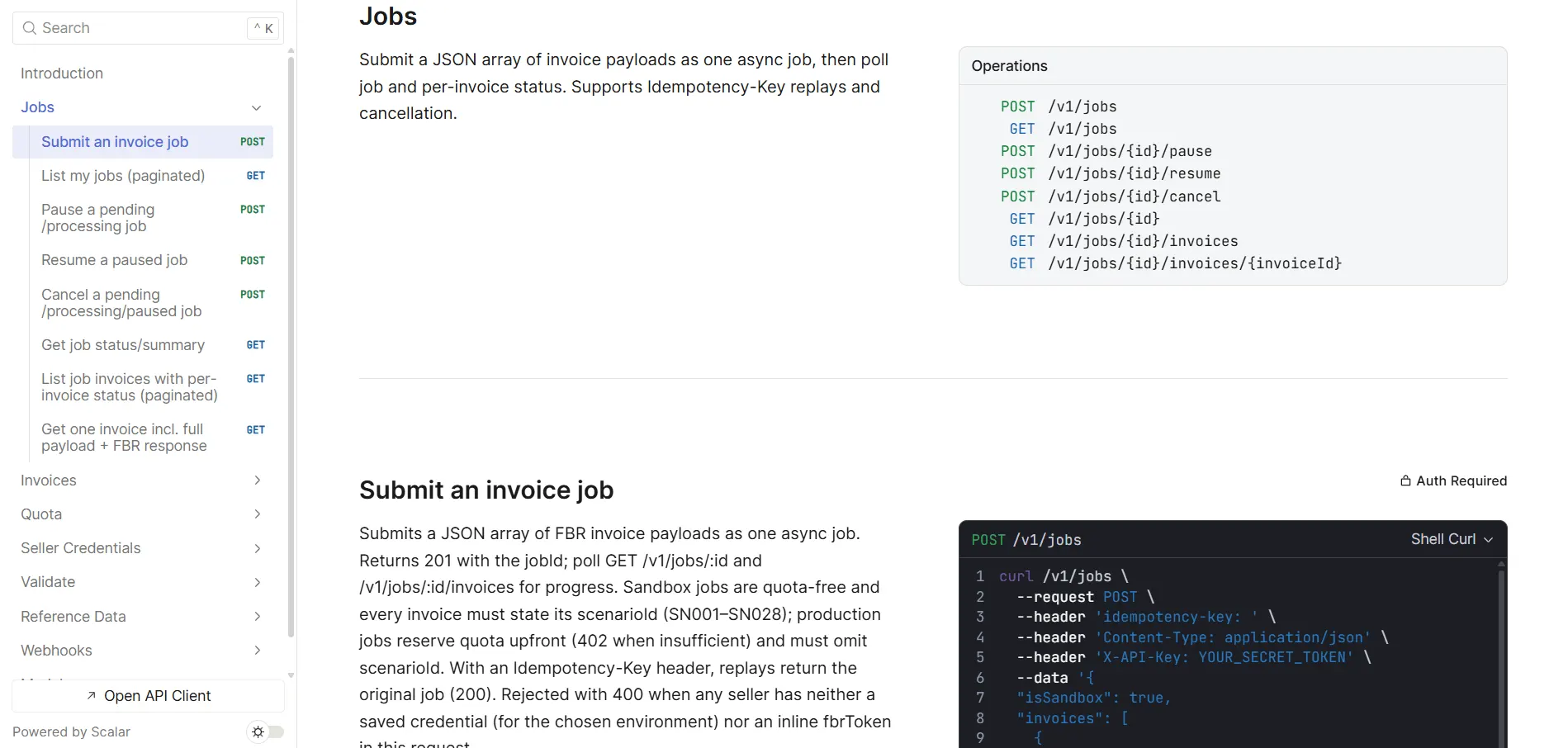
For IT and finance leaders running SAP, Dynamics, Oracle, or custom billing who need a dependable digital invoicing path aligned with FBR rules.
Architecture choice
Build inside the ERP vs a ready FBR layer
Custom FBR modules inside SAP or Dynamics look tidy on a whiteboard — until the first technical notice update lands.
Direct build inside the ERP
- Long projects that consume scarce ERP developers
- Every FBR schema change becomes an ERP transport
- Bulk, retries, and idempotency easy to underestimate
- Harder to swap integrators or add non-ERP channels later
ERP → eInvoicePro → FBR
- ERP keeps commercial truth; API handles FBR-specific validation
- One place to update when FBR technical specs change
- Bulk and status polling without customizing core ERP
- Business demo plus developer docs for parallel workstreams
Who does what
Clear ownership before you start
Projects stall when RACI is fuzzy. Align these three roles in writing before mapping fields.

Finance
Invoice types, tax treatment, buyer data quality, UoM, and sign-off on sandbox cases that mirror real revenue.

IT / systems
Environments, SSO, field mapping, job scheduling, monitoring, and credential hygiene between sandbox and production.
Tax advisor
Scope under SRO 709 and related notices, integrator eligibility, and compliance questions — not answered by software vendors.
FAQ
Frequently Asked Questions
Can SAP or Dynamics connect to FBR?
Yes. Enterprises typically export invoice data from the ERP (or middleware) and submit through a dedicated FBR layer such as eInvoicePro’s API, rather than encoding every FBR rule inside an ERP customization. That keeps upgrades cheaper and concentrates FBR changes in one place.
Do we have to replace our ERP?
No. The usual goal is to keep the system of record your teams already use and add a reliable digital submission path. Replacement is a last resort — integration is the norm for sales tax registered businesses with existing finance systems.
Who should own the project — IT or finance?
Both, with clear RACI. Finance owns tax treatment, invoice types, and business sign-off on test cases. IT owns environments, authentication, field mapping, job scheduling, and monitoring. Tax advisors cover regulatory scope. Software vendors assist with API and product configuration — they do not replace advisors.
What data should leave the ERP vs stay in eInvoicePro?
ERP should remain authoritative for commercial data: customers, items, quantities, prices, and GL postings. The FBR layer adds validation, submission, status polling, and storage of official confirmations. Avoid duplicating master data in two places without a sync strategy.
How long does ERP integration take?
Timelines depend on ERP version, middleware, invoice complexity, and master-data quality — not only API documentation. Teams that invest in sandbox test cases and a controlled pilot go-live move faster than those that skip representative failures. Book a technical walkthrough if you need a realistic plan.
By system
Find your ERP or accounting system
Same ready-layer pattern, written for how each system actually holds and moves invoice data.
SAP + FBR
SAP ECC and S/4HANA.
Read moreOdoo + FBR
Self-hosted, Odoo.sh, or a partner install.
Read moreTally + FBR
TallyPrime and Tally.ERP 9.
Read moreQuickBooks + FBR
QuickBooks Online.
Read moreNetSuite + FBR
Oracle NetSuite, SuiteScript and SuiteTalk.
Read moreBusiness Central + FBR
Microsoft Dynamics 365 Business Central.
Read moreZoho Books + FBR
With or without Zoho Flow.
Read moreContinue
Related reading
API product page
Capabilities and ERP fit for technical buyers.
Read moreSandbox to go-live
Checklist before live customer invoices.
Read moreSAP + FBR guide
SAP-specific considerations when applicable.
Read moreIntegrator vs software
Where the gateway fits in the architecture.
Read morePlanning your rollout timeline
Building integration milestones as dependencies, with owners.
Read moreMapping tax codes to FBR sale types
The one-time mapping every ERP needs: sale type, rate, SRO, HS code and unit.
Read moreReady to simplify your FBR digital invoicing?
Join 2000+ businesses that use eInvoicePro to make invoices and send them to FBR.