

Wholesalers & distributors
Clear large order books without living in a single invoice screen all day.
Bulk Digital Invoicing
For busy businesses and accounting firms in Pakistan. Less typing, and more invoices right the first time.
Trusted Nationwide
Tax advisers and CA firms who help businesses get started with FBR invoicing.














Who it’s for
Clear large order books without living in a single invoice screen all day.
Keep goods moving and bills going out, while staying in line with FBR.

Look after many clients with the same simple steps each time.
Readiness check
An honest check. Bulk helps when you have lots of invoices and lots of fixing to do. Otherwise you may not need it yet.
How a bulk run works
It works the same way whether you upload in the app or send a job through the API.
Download the invoice template. Fill one row for each invoice line: buyer NTN or CNIC, items, quantities and tax type. Your team works in a spreadsheet, not a form.
Every row is checked before anything goes to FBR. You see which rows would fail and why, so you fix problems at your desk, not after FBR rejects them. Across the platform, 98% of submitted invoices pass FBR's checks.
FBR wants each invoice sent on its own, so that is what we do. The bulk part is getting them ready, not sending them all in one go. One failed row does not hold up the rest. Fix it and send just that invoice again, without uploading the whole file. Long runs can be paused and started again.
Each accepted invoice comes back with its FBR invoice number and QR code. You can download a status report for the whole job, for finance and audit.
Watch it run
A short video of the bulk tool: filling the Excel template, uploading it, reading the check results and sending to FBR.
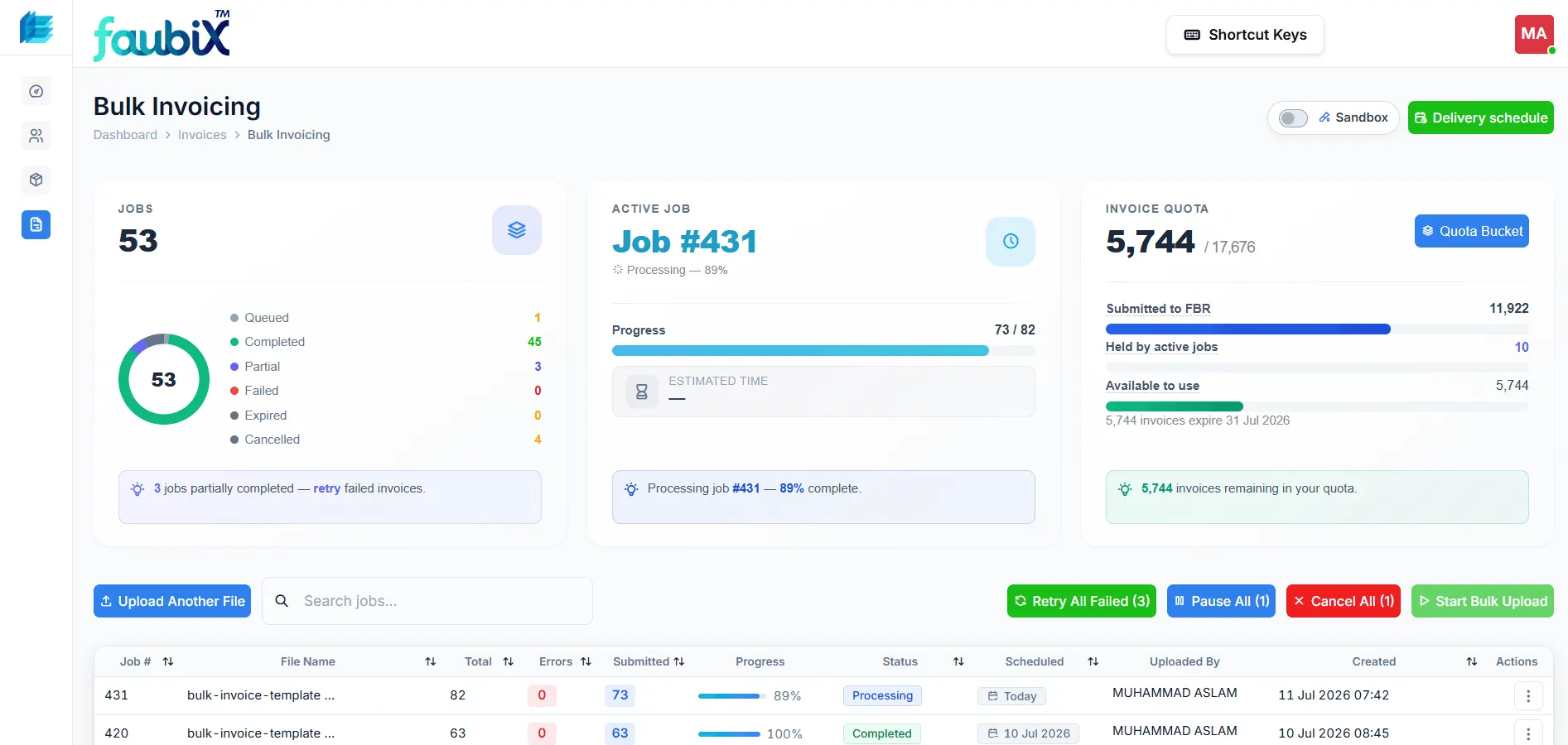
Bulk dashboard
Track jobs, watch progress and spot failures before they pile up.
See all your bulk jobs in one place: waiting, running and done.
Open any single invoice to find and fix a failure quickly.
Watch how many invoices you send each day, so you stay within your plan.
Two ways to go bulk
Same result. Pick the way that suits your team.

Busy teams handle lots of invoices in the app, with no software to build.

ERP and other systems send invoices in bulk through the API, made for high volume.
FAQ
Common questions about bulk FBR invoicing.
It means handling many sales tax invoices for FBR in one go, instead of making each one by hand. eInvoicePro handles large volumes in the app and through the API.
No. FBR wants each invoice sent on its own as soon as it is made, and its guidance says bulk upload is not allowed. Bulk invoicing here means getting many invoices ready at once. You work in one file. The system then sends each invoice to FBR on its own and tracks each one.
An Excel spreadsheet. Download the invoice template, fill one row for each invoice line, and upload it. No special software or developer is needed. If you already keep invoices in Excel, the move is usually easy.
Every row is checked before anything goes to FBR, so you see which rows would fail and why. One failed row does not stop the rest. The good invoices go through. You fix and resend only the failed ones, without uploading the whole file again.
Bulk sending counts against the limit on your plan, under a fair use policy. Most busy businesses stay well within it. Tell us how many invoices you make each month during a demo, and we will confirm the right limit for you.
Wholesalers, distributors, manufacturers, shop chains and CA firms with many clients. In short, anyone who makes a lot of invoices each day or month.
Yes. ERP and other systems can send large numbers of invoices through the eInvoicePro API, not just through the web screens.
If your team spends hours typing the same invoices, or failed invoices mean daily rework, bulk is worth a look. Book a demo and we will help you pick the right way for your volume.
No. Bulk is just a way of working. What you must do still depends on your registration and FBR's notices. Check with your tax adviser. eInvoicePro does the sending, however many invoices you have.
Continue
The app for teams, the API for systems, or what we have learned from busy customers.
Join 2000+ businesses that use eInvoicePro to make invoices and send them to FBR.