

Enterprises with ERP
Keep the finance tools you have and add reliable sending to FBR.
FBR Digital Invoicing API
Keep your billing system. eInvoicePro sits between your ERP, POS or own software and FBR. Your developers build the link once, and do not have to rebuild it every time the rules change.
Trusted Nationwide
Tax advisers and CA firms who help businesses get started with FBR invoicing.












Who it’s for
If your invoices live in an ERP, POS or your own software, connect that system. You do not need to replace everything overnight.
Keep the finance tools you have and add reliable sending to FBR.
Software houses and in-house teams connect once and serve many clients.
Send invoices from the tools your counters already use.

Send many invoices through the API, not one screen at a time.
Build vs buy
You can connect to FBR yourself. But most IT teams underestimate the work that never ends. Here is how the two ways compare.
API capabilities
What your tech lead needs to know. Endpoint details are in the developer docs.
Send invoices from your system and get back a clear success, or an error that tells you what to fix.
Send hundreds of invoices in one request. Made for ERP batch runs, not one screen at a time.
Catch format and tax rule problems before they reach FBR, so fewer live invoices fail.
Get the FBR invoice number and QR data back in your system, for printing and for your audit trail.

Test safely with sample data before you switch to live login details.
Works with SAP, Dynamics, Oracle, POS platforms, or any stack that can call a REST API.
How it fits
A simple path: keep your software, connect through eInvoicePro, and stay in line with FBR.
For developers
Enough to judge whether this fits your stack. Full endpoint reference, schemas, and field-level detail live in the developer docs.
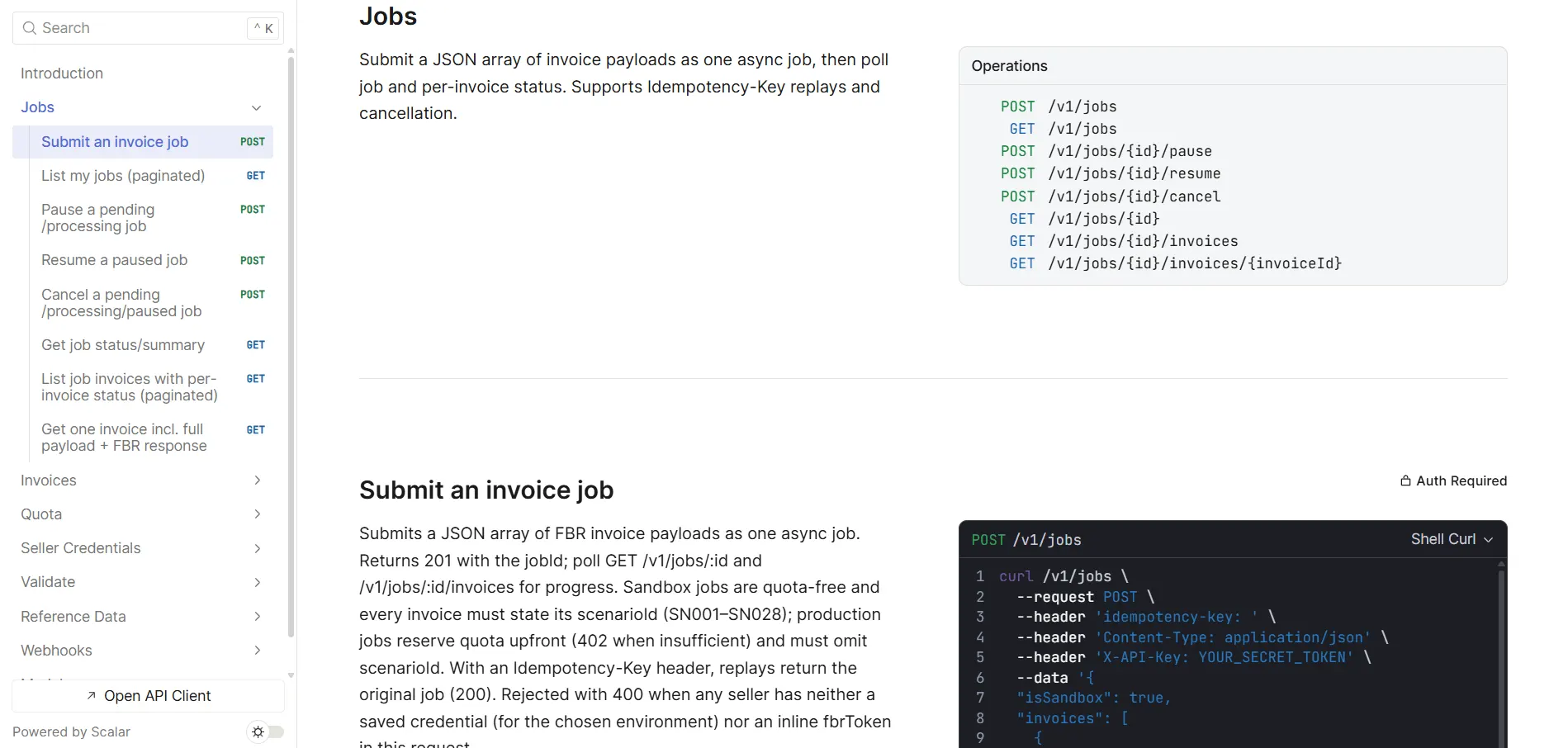
One API key, sent as either an Authorization: Bearer or an
X-API-Key header — no OAuth handshake, no token refresh. You also supply the
seller’s own FBR token, saved once against their NTN or CNIC. Sandbox and production share
one base URL and one key; they differ only by a flag on the request.
Validate a single invoice against FBR without submitting it, without creating a job and without consuming quota — FBR’s response comes back verbatim. Reference lookups head off the most common rejections: which units of measure FBR accepts for an HS code, and which rate and SRO fields apply to a sale type.
A submission is a job of 1 to 1,000 invoices — the same endpoint whether you file one or a thousand. Send an idempotency key so a network timeout can’t double-file. Then poll the job, or subscribe to webhooks for invoice-submitted, invoice-failed and job-completed events. A running batch can be paused, resumed or cancelled.
Partial success is normal — one bad row does not sink the batch. Each row carries a typed failure reason, and you can fetch the exact payload sent plus FBR’s raw response, so you debug against real bytes rather than a re-worded summary. Retry re-queues that single invoice, not the whole job.
The invoice payload is FBR’s own digital invoicing schema, unchanged — this API does not invent its own invoice format, so existing mapping work carries over. Sandbox invoices carry an FBR scenario ID (SN001–SN028); production invoices do not. Production submissions draw on your plan’s invoice quota, and a short account is told before anything reaches FBR.
Go-live path
A typical plan for ERP and billing teams. The time it takes depends on your system. Check with your tax adviser what applies to you.
List the fields your ERP or billing system already has, and what must be matched to FBR's format.
Your developers connect to the test system and check sample invoices. Nothing real goes to FBR.
Send test invoices next to your normal process, and check the results match.
Switch on your live login details and send real customer invoices through the API, in bulk too when needed.
Getting started
Simple steps for business teams. Your tech team can open the docs whenever they need more detail.
Tell us whether you use an ERP, POS or your own billing system, and how many invoices you make.
We show you how eInvoicePro sits between your system and FBR.
Your team connects through our API and tests safely before going live.
Send real invoices, in bulk too when you need it.
FAQ
Answers for business and IT leads looking at an FBR API link.
It helps ERP, POS and billing systems send invoices to FBR. Your software calls eInvoicePro. We handle the hard FBR work, the checks and the replies, so your team does not have to build that part.
Linking straight to FBR often means a long setup, special testing and constant upkeep when rules change. eInvoicePro is built for real business systems, so your team goes live faster with fewer surprises.
Yes. Busy businesses and software teams can send many invoices through the API, not only one by one on the screen.
Large companies with an ERP or their own billing system, software houses building for clients in Pakistan, and any team that needs reliable FBR sending without building the hard part itself.
With a single API key created in the developer portal, sent as either an Authorization: Bearer header or an X-API-Key header — whichever your HTTP client makes easier. Either one alone is enough; you never send both. Every endpoint requires it, including the reference lookups.
Yes, and it uses the same base URL and the same API key as production — you switch by setting isSandbox on the request. Sandbox jobs do not consume quota, and every sandbox invoice carries its FBR scenario ID (SN001 to SN028). You can also validate a single invoice against FBR without submitting it at all.
The rest of the batch keeps going — one bad invoice does not sink the job. The failed row records why it failed, and you can fetch the exact payload that was sent along with FBR’s raw response for that row. Once the job has finished you retry just that invoice, rather than resubmitting everything.
A single job takes between 1 and 1,000 invoices, and the same endpoint handles one invoice or a thousand. One batch can mix invoices belonging to different sellers, because each invoice carries its own seller NTN or CNIC and the platform picks the right FBR credential per row.
Seller FBR tokens are write-only and encrypted at rest: you can save or rotate them, but the API never returns them — only whether a sandbox and production token exist. Webhook deliveries are signed, and the signing secret is shown once when you register the endpoint.
Open the eInvoicePro API docs for endpoints, formats and setup. Business teams can book a demo first if they want someone to walk them through it.
By system
Each of these systems connects to the API above. Find the guide for your system.
SAP ECC and S/4HANA.
Read moreSelf-hosted, Odoo.sh, or a partner install.
Read moreTallyPrime and Tally.ERP 9.
Read moreQuickBooks Online.
Read moreOracle NetSuite, SuiteScript and SuiteTalk.
Read moreMicrosoft Dynamics 365 Business Central.
Read moreWith or without Zoho Flow.
Read moreContinue
Deeper reading before you connect.
How SAP, Dynamics, Oracle and custom systems usually connect.
Read moreA practical checklist before real customer invoices go through.
Read moreHigh volume through the API — not only the web screens.
Read moreEndpoints, login and examples for developers.
OpenBook a demo for a guided walkthrough, or open the API docs for your builders.